Tuesday, October 31, 2006

Microsoft and Secunia at it again. And FF 2 too affected?


It seems that Microsoft and Secunia is at it again. This is the second debate between the security company and Microsoft since the launch of Internet explorer 7. The first one was the for the mhtml re-direction information disclosure security flaw when Microsoft said it was a outlook express problem and Secunia pinning it on Explorer 7 saying since the browser paves way for it, it has to be held reponsible. Read about it here.

And now with the latest threat, the window injection security flaw they are at it again. Secunia says that it is a
vulnerability and that Firefox and Opera treated it as a vulnerability and already patched it within two months of this being reported in 2004 but Microsoft just didn't treat it as one and left it upatched and let it continue in explorer 7.

In the Microsoft Security Response blog they say that it is not a vulnerability. This is an excerpt from their response in the blog:-
"Like we always do, we investigated that claim thoroughly in 2004. We found that in all cases, for this to represent a threat for phishing or spoofing attacks, a user would have to decide to trust the authenticity of the page without verifying the page’s address (because there was no address bar) and without verifying an SSL connection (like we recommend on our website).

In other words, the scenario requires that you intentionally not use the security features specifically put in place to help protect against phishing and spoofing attacks. Because of that, we said in 2004 that this issue doesn’t represent a security vulnerability as we have defined it on our website.

Now, that said, we take all reports seriously even when they’re not security vulnerabilities. In this case, we did look at the scenario in question and asked ourselves what we could do to help improve our anti-phishing and anti-spoofing features so that customers can better protect themselves. We decided that one thing we could do was to add a feature to IE 7 where it always shows the actual URL of the web page, even in pop-up windows. So we added a pop-up window address bar, enabling users to more accurately make a trust decision."

Secunia's response to this was "Today, in 2006 they (Microsoft) still say this isn't a vulnerability - despite the fact that they intended to protect users against this in IE7 by disabling the "Navigate sub-frames across different domains" "functionality" by default."

Secunia has given anillustration on how the latest security flaw (window injection vulnerability) can be misused by a malicious site and why it treats it as a security flaw and how even the newly added and
always visible address bar in Internet explorer 7 does not mitigate this.

Now what I wonder is when Secunia says that Firefox and Opera took care of this issue within two months of this security flaw reported across multiple browsers way back in 2004 why only Microsoft has dealt with it in a different way. May be like they say they don't consider this as a security flaw or vulnerability.

And yesterday I read on Betanews that Firefox 2 has also been detected with the same security flaw. When it has been said that both Opera and Firefox took care of this issue way back then how come it has cropped up again in Firefox 2. Betanews says they conducted some tests on Firefox 2 too and it has some issues with this.

So far I have not seen Mozilla saying anything about this officially. I would like to know from Betanews that whether they got any response from Firefox 2. I have already posted about this in the mozilla forum. May be we can get an answer there.

Monday, October 30, 2006

Yet another security flaw spotted in IE 7 today.


Secunia has confirmed today that a window injection vulnerability has been detected in internet explorer 7. This is now the third vulnerability that has been spotted in IE 7 the first two being the Internet Explorer 7 "mhtml:" Redirection Information Disclosure and the Popup Address Bar Spoofing Weakness. Among these two the mhtml vulnerabilty as I had mentioned in my earlier article lead to a debate between Microsoft and Secunia as Microsoft said that since the actual problem for the mhtml vulnerability lies with outlook express it cannot be attributed to Explorer 7 and Secunia saying that the vulnerability is fully exploitable via IE, which is the primary attack vector, if not the only attack vector.

Now this security flaw on IE 7 detected by Secunia and released today is termed as moderately critical where as the other two were termed as just moderate. This security flaw can be exploited by malicious people to spoof the content of websites.

According to the report a website can inject content into another site's window if the target name of the window is known. This can e.g. be exploited by a malicious website to spoof the content of a pop-up window opened on a trusted website.

The vulnerability has been confirmed on a fully patched system with Internet Explorer 7.0 and Microsoft Windows XP SP2.

What I find really amazing about this is that this vulnerability was actually reported on 2004-12-08 by secunia for explorer 5.01, 5.5 and version 6.x So does this mean that this issue was not addressed and patched earlier by Microsoft in their earlier versions and that it has just been passed onto the version 7?

And another thing to be noticed is that this same window injection vulnerability was detected in many other browsers including firefox, Opera, Netscape etc:- in 2004. It was an issue for multiple browsers at that time. But so far I have not seen this issue mentioned by Secunia for the Firefox 2. So it makes me wonder whether Mozilla has patched this in Firefox but Microsoft simply left it out. Or may be Secunia has not yet tested this security flaw on Firefox 2. I mean if this issue which was earlier detected in 2004 has been patched in Firefox and other browsers but hasn't been patched only in Explorer then that is really something very unpleasently surprising.

We have to wait and see the Microsoft's response to this and also let us see whether this same problem exists with Firefox too.

Secunia's today's report.
Secunia's report in 2004.

UPDATE: Just after I finished this article it has been confirmed now that Fire Fox 2 is also facing the same security flaw. I was in the right direction when I mentioned that since it was a mulitple browser problem including Opera, Firefox, Netscape and Explorer originally reported in 2004 by Secunia it could mean that those browsers could be affected too. I am waiting to see what the other browsers too have to say.

You can read the latest news on Firefox too being affected by this here.

Friday, October 27, 2006

All IE 7 and Firefox 2 Vulnerabilities as of date.


INTERNET EXPLORER 7 ISSUES.

  • Internet Explorer 7 "mhtml:" Redirection Information Disclosure
First one that stands out is the outlook express vulnerability which uses IE7. It was traced back to nov.2003. So that means it is an old issue which has still not been adressed properly. The flaw actually lies in Outlook Express. Microsoft is still investigating the issue. Even though the flaw lies with the outlook express and the older versions of explorer like IE6 have been facing this issue a lot of attention has been drawn to these with the launch of IE7.

The vulnerability apparently involves a very simple trick where a call to a MIME HTML, or MHTML, resource can trigger the running of an executable file, even with high-level security settings. Secunia rates this problem as "less critical," perhaps mainly because this is a trigger mechanism rather than a full-scale virus or Trojan. Conceivably, however, it could be utilized by malicious users within a more complete malware setup. The impact is exposure of sensitive information according to Secunia. The vulnerability is caused due to an error in the handling of redirections for URLs with the "mhtml:" URI handler. This can be exploited to access documents served from another web site.

Microsoft responded to reports of the first exploit affecting Internet Explorer 7, which cropped up less than 24 hours after the browser's official launch. Christopher Budd from Microsoft's Security Response Center says the flaw lies not in IE7, but in an Outlook Express component.

Secunia has confirmed the vulnerability on a fully patched system with Internet Explorer 7.0 and Microsoft Windows XP SP2. Other versions may also be affected.

Even if this vulnerability is not directly related to IE7, the security company Secunia does not exclude IE7. Secunia CTO Thomas Kristensen held true to his company's stance that the exploit is attributable to Microsoft's new Web browser. He says that "Microsoft claims the recent IE7 vulnerability is an Outlook Express vulnerability," begins Kristensen's statement to us. "This may be true, from an organizational point of view within Microsoft. However, the vulnerability is fully exploitable via IE, which is the primary attack vector, if not the only attack vector."


  • Internet Explorer 7 Popup Address Bar Spoofing Weakness

This spoofing issue uncovered by an anonymous discloser which was tested by the security firm Secunia and is categorized as less critical appears to be the first genuine, publicly disclosed flaw in the new Microsoft browser. The outlook express issue is a different story since according to microsoft it is not an IE7 vulnerability and as far as Secunia goes since the vulnerability is fully exploitable via IE they won't exclude IE7 from that. SO that issue is entirely upto to the users to whether take it as IE vulnerability or the outlook one. But this one without doubt points directly to IE 7.

The issue occurs in popup windows. It is possible to display a somewhat spoofed address bar, the company said. According to Secunia the problem is that it's possible to display a popup with a somewhat spoofed address bar where a number of special characters have been appended to the URL. This makes it possible to only display a part of the address bar, which may trick users into performing certain unintended actions.An attacker could exploit this weakness to trick people into believing they are on a trusted Web site when in fact they are viewing a malicious page, Secunia said in an alert.

According to an email statement issued by a Microsoft representative to Zdnet the problem lies in the way Web addresses are displayed in the IE 7 address bar. An attacker could exploit the issue by tricking a user to click on a specially formatted link, the representative said.

However, an attack won't work if a Web site is known to be part of a phishing scam since the IE 7 phishing shield will identify such sites and warn the user. And so far Microsoft is not aware of any attacks that actually use the reported vulnerability, the company said.

This issue is currently under investigation by Microsoft and they have said that once it is completed they will take the appropriate steps to protect it's customers.

However George Ou in his blog gives a solution..he says "The address bar spoofing weakness against IE7 happens when a small popup is spawned and a URL shows up with trailing spaces. The trailing spaces pushed the URL to the left and partially out of site which hides the actual domain and shows you a fake domain. If you click anywhere on the popup page or click on the background window, the left side of the URL and the actual domain name is revealed but the initial spoofing condition might be useful in a phishing attack to the unsuspecting user. This condition is repeatable when you click on the address bar and that is probably what is being exploited since the popup first shows up with the address bar in focus. The possible solution to this would be to strip out the trailing spaces (since spaces aren't supported in URLs anyways) when popping up browser windows or not allow it to start with the address bar in focus."

I hope they do take the necessary actions before these less critical issues are massively exploited by some of the malicious minds out there. No wonder it is reported that microsoft has chided the anonymous disclosure because it prefers that security issues be disclosed privately so it can repair them before they get publicly known.

Outlook express issue sources:-
Betanews.
Secunia's related info.
Zdnet's related article.

Spoofing issue
sources:-
Zdnet's related article.
Secunia's related info.
George Ou's article

Also talking about IE7 I thought I would share this article titled "Is Internet Explorer 7 spying on me?" which i saw at the DCoT blog. Take a look at it here. It is interesting to read not just the article but there is a good discussion going about it in the comments area. As far as the debate about the browsers go I personally feel that both has it's own advantages and I use both.


FIRE FOX ISSUES

Now on the other end Mozilla's Firefox is having it's share of security issues and along with the glory it's getting tainted with it's own security issues. Here goes:-

  • Issues brought up by Bugtraq:

First issue was again surprisingly in this case had something to do with mails. Bug tracking mailing lists have been talking about a flaw affecting the just released Firefox 2. Even though Bugtraq called the condition critical Mozilla's security chief Window Snyder insisted the report is wrong and that the problem was already "fixed". And Secunia which has reported both the IE7 issues has listed this issue as affected by zero Secunia advisiories.

Actually it all started when Bugtraq mailing list reported that the issue, labeled "critical" by Mozilla, resurfaced in Firefox 2. But Mozilla says the Firefox bug was considered critical and "fixed" last month.

Crash condition:

Window Snyder admitted a crash condition remained. "The exploitable issues are fixed. There is a crash, but it is a denial of service," Snyder said. "We're going to look at it and make sure there is really nothing there."

George Ou says in his zdnet blog that "any kind of flaw that can cause an application to crash has to be alarming because it might be exploitable. It sounds like some modifications were made to make the exploit condition less exploitable but a crash condition still exists." And he goes on "this may or may not still be a serious flaw since the exploit still crashes Firefox 2.0. At some point Mozilla would have to admit this is a problem and really fix it so that the browser doesn't crash at all."

Cyberscams issue:

Another report on the Full Disclosure mailing list suggested that there is a flaw in Firefox 2 that could be exploited to aid in cyberscams. The report included some computer code, but not enough for Mozilla to determine whether there is a problem, Snyder said.

"We don't have enough information to identify it. If we get more information, then we will investigate," she said.

Two old issues still unpatched on FireFox:

There are still two 2 rated vulnerability (rated by Secunia out of 5 which is a similar rating to the two issues in IE7) that has still not been patched by Mozilla. They are:-

1.Mozilla / Mozilla Firefox Cross-Domain Cookie Injection Vulnerability
2.Mozilla / Mozilla Firefox Apple Java Plugin Tab Spoofing Vulnerability

Check them out here. vulnerability 1 vulnerability 2


Sources:
Mozilla's info on bug tracking issue fixed last month.
Secunia's info on bug tracking issue.
Zdnet related article.

George Ou's article about media bias.


So it seems the both IE7 and Firefox are having a common issue when it comes to phising.

Talking about the phising issue here is another article that talks about how it has grown and the number of brands under attack from phishing was up 20 percent from June and 12 percent from the previous record in May. An interesting thing to note from the article is that "The survey found a large increase in traffic redirectors, and DNS redirectors in particular. These modify a system's DNS settings to direct some or all DNS lookups to a fraudulent DNS server capable of directing users to fraudulent sites when particular addresses are entered."

Read more from the survey and news about phising here.


Wednesday, October 25, 2006

Fire fox version 2 . Tweak it up baby with this guide.


Folks,
This is a must read for all those firefox fans out there. As you all know fire fox just recently released its version 2 (if you did not know it is high time you get out from under that rock). I just came across this tweaking guide for the browser written by Koroush Ghazi. It is a very well laid out guide. As he calls it it's a true objective TweakGuides tweak guide, and not a gushing ad for a free web browser.

I am was so happy when firefox released it latest version and now I guess with this guide we already have something to play around with the new browser toy for the big boys. Since he has a big intro and all I suggest you start reading from page 6 onwards because the basic tips and tweaks starts from there and the advanced tweaking part starts from page 8.

Digg it or you can go directly to the guide here.

More adsense and other useful tips from the blogosphere.


Yesterday I had posted about adsense tips from the google adsense expert and today I had spent more time at the google adsense blog and I thought I wld share some of the information I found useful. Also at the bottom of the article I have given links to other useful related resources I find useful for people who are planning to make blogging their profession and earn some money out of it with ofcourse the primary focus being on providing people with good articles.

GENERAL ( For any website)

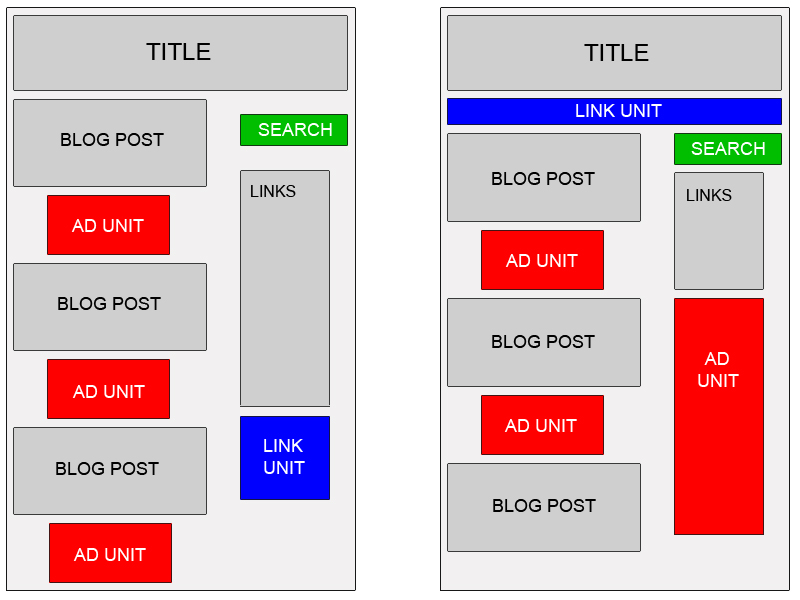
  • Try using large Rectangle Ad (336 x 280) or the the 728x90 Leaderboard, 160x600 Wide Skyscraper, and 300x250 Medium Rectangle. Try to pick the three among this which you think would best suit your site.

  • Increasing ad unit presence on your site and placing ads 'above the fold' (i.e., the area visible on a page without scrolling down) can enhance the likelihood that people will see and respond to your ads.

  • Article based pages are an exception, as placing ads directly below an article can lead to a greater number of readers clicking through.

  • Embed the ads. If you wanna know what that means check it out here.

  • Ads placed near rich content and navigational aids usually do well because users are focused on those areas of a page.

  • Google strongly recommends putting your users first when deciding on ad placement.

  • On pages where users are typically focused on reading an article, ads placed directly below the end of the editorial content tend to perform very well. It's almost as if users finish reading and ask themselves, "What can I do next?" Precisely targeted ads can answer that question for them.

Three more tips specific to blogs:-

  • Blend your ad units into the background of your blog. Choose a bold color for the ad title to help draw attention to your ads, then make sure that the background and borders of your ads are the same color as the background of the area where the ad is placed.

  • In general, wider ad formats tend to be more reader-friendly. Placing an ad unit after the first post will likely catch your readers' attention. Take a look at the Google sample implementations to get some ideas.

  • Also, consider placing a Skyscraper (120x600) or vertical link unit on the right side of your blog. If you're using Blogger, you can find instructions on placing AdSense code in your blog's sidebar at blogger.com

The sciencedaily.com website had some great success with adsense and here is how it happened:-

According to Hogan the person who set up the website "It was easy to get started, even with setting up sophisticated ad filtering, but the real value of AdSense was apparent once the ads began running." Using AdSense for content, Hogan matched his own site's color scheme and content, maintaining a presence as a serious science daily. "The ads really match our articles," he says. "For visitors, the AdSense ads are a useful extension of our content. That's what's great about Google AdSense—the ads are appealing and appropriate." Read the article here.


The effectiveness of Hogan's cost-per-click ads on AdSense is four to five times that of the other ad networks.
Based on Google's recommendations and his own testing, he moved ads from the bottom of pages to the directly below articles. Average eCPM immediately jumped by 10 percent.

"AdSense for search performs extremely well. It gives us an exceptional click-through rate of 10 percent and generates 10 to 20 times the clicks of a job search service we've tried," Hogan says. "Plus, by using Google site search, I can now drive traffic to content on ScienceDaily that visitors might not find otherwise."


Content.

But just like google says you should remember that it is the people first and hence the content. And also a lot depends on your website's layout. Basically the ads must blend with your website's design and yet stand out. But if there is no good content it will be of no use. The ads should be an useful extension of the content not the other way round. If you don't have a passion for what you write and say it will certainly show.

If you need some tips about writing you can find some at these folksonomy and problogger pages.

Also at stevepavlina's blog he has written a very big article about how one should approach if you are thinking about making blogging your profession and trying to make some money out of it. You can read the article right here.

As I learn things I would like to share and I hope this helps the people who haven't been able to keep track of this things due to some reason. Also it is always good to go around checking the established websites and blogs and analyse how they have structured it.

Tuesday, October 24, 2006

Tips from the google Adsense optimization specialist (For those who have missed it).


Even though most of you must have read this in the google adsense blog or at some other blogs, these tips I came across I found to be very informative and wanted to share with some of my readers who might not have come across this.

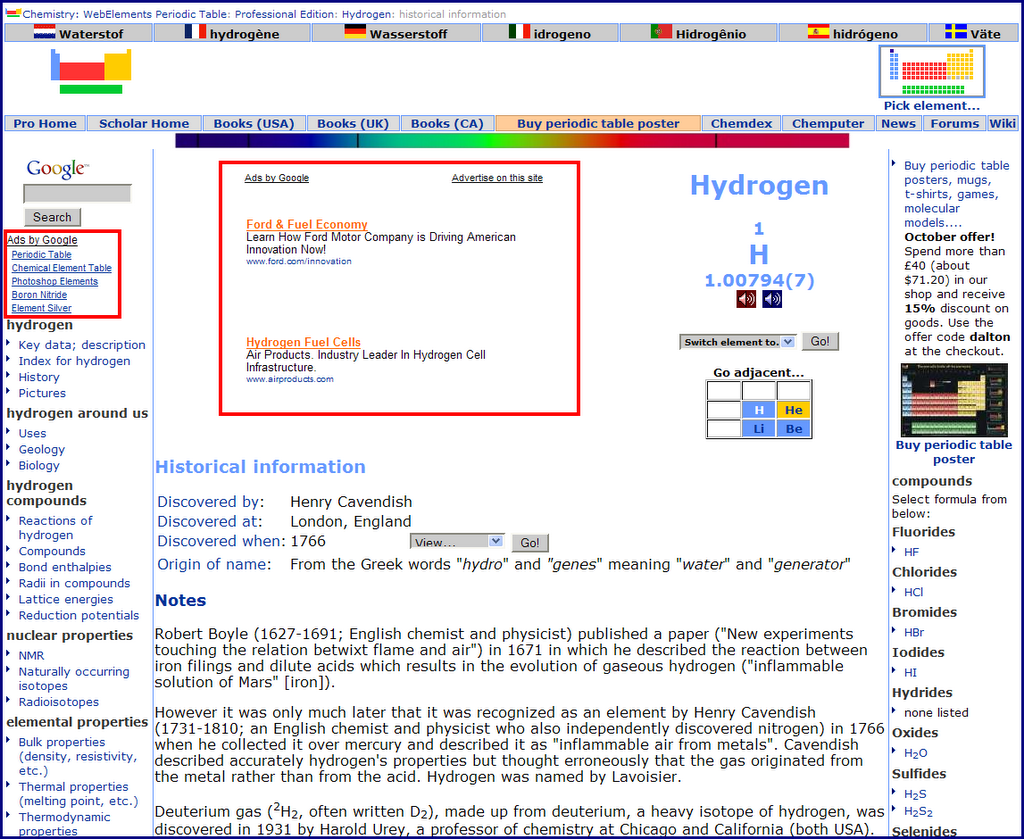
To start with what amazed me was the story of a website who turned their adsense earnings around from $10/day to $1700/day in a matter of few days just by changing the adsense layout. This goes onto show how choosing the proper lay out and blending it properly to go with the design of the site prompts more visitors to click on them. It is a great psychological factor. The sites name is webelements.com and here is a snap shot of
the site with the adsense layout that revoltionized their adsense earnings. They found success by adding link units to each page of their site, placing Large Rectangles directly before and after their content, and adding a Wide Skycraper to their left sidebar. I guess this site must have already been having a pretty good traffic and just that the visitors were not clicking on the ads since they were poorly placed before the changes they made.

In the words of the google adsense optimization specialist Ivan Heneghan "They were using a 468x60 Banner at the bottom of their pages, but started experimenting with two 300 x 250 Medium Rectangles -- one placed just at the top of their content, and another placed directly under the main content on each page. They also tried using more blended colours. Things went crazy from there and earnings shot up to $700 per day. Finally, they moved one of the 300x250 Rectangles from the top of their page to a location more embedded in their content. After that, earnings went to over $1,700 per day!"

Ivan also gives his top three tips. They are:

1. Use wide ad formats. Many publishers find the 728x90 Leaderboard outperforms the 468x60 banner by about 70%. I particularly recommend using the 728x90 Leaderboard, 160x600 Wide Skyscraper, and 300x250 Medium Rectangle.

2. Embed Google ads in your content, and place Google ads at the end of your articles, news stories and reviews. Placing a 468x60 Banner in the typical slot at the top of page, or a 120x600 Skyscraper along the right-hand side of page, work well for cost-per-thousand impressions (CPM) ads. However, for cost-per-click (CPC) contextual advertising, AdSense tends to work best when integrated with your content.

3. Blend your ad colours into your website. After running a test with a bright pink 728x90 Leaderboard on a black background, I learned that complementary colours often work better. Try blending the background and borders of your ads into your site, and use a text colour that stands out but already exists on your site. Blending decreases ad blindness and users are more likely to notice ads that interest them.

Source 1
source 2
Link to google's adsense optimization page.

(I mentioned about this here in my blog for the sake of those readers who might have missed this one and I hope it helps them)

Google