Tuesday, November 14, 2006

Best Free Antivirus Softwares

Ok there are a lot of anti-virus progs out there. But as always with whatever we do when we set out to buy something or in this case to give them the freedom to sit on our PC and place our faith in them, let us filter the bad out there and narrow down on the best choices among the free Antivirus softwares.


AVG ver 7.5.4
This latest version of AVG is a great free AntiVirus tool. Rapid virus database updates are available for the lifetime of the product. Version 7.5.4 includes improved virus detection based on better heuristics and NTFS data streams scanning; a smaller installation and update files; and an improved user interface. The newest version is also compatible with Windows Vista.

It is easy to install and use and has real-time antivirus protection of files and e-mails, maximum security - recent certifications include VB100%, ICSA, and WestCoast Labs Checkmark. And as usual it offers regular and automatic database and program updates
It supports both Windows and Linux.
Get it from CNET Download.com!

Avira AntiVir PersonalEdition Classic 7 6.36.01.01

This latest version features enhanced protection against unknown boot-sector viruses, issuing alerts for boot sectors suspicious formats. Through the permanent update of the detection engine, the protection is ensured constantly: the user can set the product to download any updates when available, thus keeping you clean and safe.

Avira PersonalEdition Classic constantly and rapidly scans your computer for malicious programs (such as viruses, Trojans, backdoor programs, hoaxes, worms, dialers etc.), monitoring every action executed by the user or by the operating system and being able to react promptly when a malicious program is detected.



Avast! Home Edition 4.7.892

This latest version is a free complete ICSA certified antivirus software for home noncommercial use. Avast includes the following components: On Demand Scanner--with skinnable simple interface--just select what do you want to scan in which way and press the Play button; On Access Scanner--special providers to protect the most of available e-mail clients; Instant Messaging--ICQ, Miranda; Network traffic--intrusion detection--lightweight firewall; P2P protection for Kazaa, BitTorrent; Web shield--monitors and filter all HTTP traffic; NNTP Scanner--scans all Usenet Newsgroup traffic and all operations with files on PC.


Get it from CNET Download.com!

  • Free online scanning by all the top ranked AntiVirus software makers:-
One thing everyone should keep in their mind is that all t he free softwares are good but not as good as the paid softwares. And the good thing is that all the paid softwares offer free online scanning and one would want to take advantage of that.

BitDefender--Free online scanning ..go here.
Mcafee--Free online scanning..go here.
Kaspersky--Free online scanning..go here.
F-secure--Free online scanning..go here.
Symantec(Norton)--Free online scanning go here.

Keep in mind that all these online scanners use Java script and Active X and hence you need to have Internet Explorer ver.5.0 (ver 4.0 in the case of BitDefender) or higher to take advantage of these free online scanners.

Like any other security software whether it is an AntiVirus or Anti-Spyware it is always good to use a combination of at least two. But using two Anti-virus software at the same time or two firewalls at the same time can lead to a clash and sometimes even a PC crash. So when it comes to Anti-virus it is always good to have one good software installed on your PC and use the free online scanning offered by another.

Note:- It is very true that no free Anti-virus comes close to the top paid Anti-virus such as Bit defender, Mcafee and kaspersky when it comes to performance. If you want real protection you have shell out that 40 or 30 dollar. With an avg of more than 10 new virus breaking out each day it is always nice to be on the safer side. But it is better to have some protection rather than having no protection at all. A good Anti-virus, firewall, Anti-Trojan and Anti-spyware/malware are the four essential softwares everyone should have on their PC for protection. Constantly upgrade each of these and all the OS and browser patches supplied by the vendors.

Special Mention:- Among paid Anti-virus softwares that NOD 32 Anti-virus is making waves now a days with it's light weight features that goes very low on CPU usage. Available on many platforms, including DOS, Linux, and NetWare, NOD32 has great speed and very excellent virus protection.

The Control Center layout and modules are a little bit confusing. The terminology is very technical. It is best for experts who would love the customization abilities and scanning power. But not an ideal choice for beginners.

Among the many feature it has is one called Dmon which scans every document before you open it in the background to prevent from script attacks and you won't even realise it. That is just one of the features available. You can get a good review of the software at softpedia.com.

Or visit the Nod32 website.

Related reading:-
27 steps to prevent Virus/Trojans.

What are rootkit viruses and steps to prevent them.
Saturday, November 11, 2006

Two free tools to organize your audio files.

This article (only this article) has been moved to techbreak.net

Three free utilties to keep you safe on the net.

Scan your computer online for viruses with this F-secure free scan.

As you know F-Secure is a highly reputed internet security provider based in Finland. It is always good to scan your pc with more than one anti-virus since one might detect a virus the other can't. But as you know having two anti-virus suite installed on your Pc might lead to a clash. So instead you can always have one installed on your Pc and utilise the online scan provided by another. So take advantage of this free scan folks.

But before you go to the site keep in mind it supports the following Operating systems:-

* Windows 2000
* Windows XP

And supports the following web browsers:

* Microsoft Internet Explorer 6.0 or higher.
* JavaScript needs to be enabled.
* You need to have ActiveX enabled.

F-secure online scan.


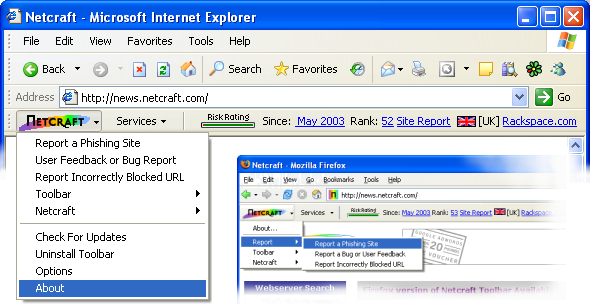
Netcraft tool bar.

If you guys remember, it was a netcraft tool bar user that spotted the fake myspace page that was used for phishing and reported it. Netcraft has been around since a long time and they are the people who keeps tab of all the phishing sites and the new Opera 9.1 which is slated to be released soon will also have a anti-phishing (or anti-fraud) feature that checks the live database constantly updated by Netcraft. So when you use a tool bar utility provided by one of the masters of anti-fraud technology you can be sure that you are at least one more step closer to being fully protected.

Download the netcraft tool bar.


ZoneAlarm firewall.

I would say that this is definitely one of the best firewalls out there. Steve Gibson, one of the pioneers in the field of security constantly keeps tracks of the security issues through this site grc.com and his Gibson Research corporation has been backing Zonealarm. It is one of the firewalls that has passed his leak test with flying colors. And moreover it is very user friendly so for home users who does not know much about the technicalities this is a very easy to handle firewall.

This is one of the firewalls that keep your ports stealthed on the net. A stealthed port means anyone using a port scanner with a malicious intend will never even see that such ports exist on your machine and because of that they won't be able to see that your machine exists on the net.

ZoneAlarm is free for individual and not-for-profit charitable entity use (excluding governmental entities and educational institutions).

Download zonealarm. (13.3 MB)

Or visit the publisher's website.

Also, check out the step by step guide to configuring ZoneLlarm.

Related reading:-
Everything you want to know about Phishing attacks.
Opera's new 9.1 browser.
Also if you check the category Computer/Internet/Software/Tech related. You might find some useful
tools and articles that will help you stay safe on the net. Since this site is new am constantly updating the contents. So check regularly for updates folks.

Highly critical vulnerabilities in Firefox and Windows OS

Mozilla Firefox and SeaMonkey Multiple Vulnerabilities.

Secunia has reported some highly critical multiple vulnerabilities in Mozilla firefox and SeaMonkey which can be exploited by malicious people to bypass certain security restrictions, conduct cross-site scripting attacks, and potentially compromise a vulnerable system.

For more details read the report.

Microsoft XMLHTTP ActiveX Control Code Execution Vulnerability

Also it seems Secunia has found yet another vulnerability with a Microsoft product and this time it is not Explorer but it is with the Operating system. It is a extremely critical vulnerability.

The vulnerability is already being actively exploited so everyone needs to stay guarded and take the necessary precaution.

See the report.

Related reading:-

Microsoft and Secunia at it again. And FireFox 2 too affected?

Yet another security flaw spotted in IE 7 today.

All IE 7 and Firefox 2 Vulnerabilities as of date.

Friday, November 03, 2006

Test your firewall, browser and your internet or site speed.

You will find three sections in this article:-

SECTION I INTERNET CONNECTION OR WEBSITE SPEED TESTS.
SECTION II FIREWALL TEST.
SECTION II BROWSER TEST.


____________________________________________________________________________________
SECTION I INTERNET CONNECTION OR WEBSITE SPEED TESTS.
____________________________________________________________________________________

Well there are other sites that lets you check your Internet connection speed but I personally prefer these two sites because they are very easy to use and they each use different methods so that you can use both of these sites to have your connection speed tested in two different ways. Read on.


Mcafee speedometer.

What the Mcafee speed test does is that it sends a 150KB file to your computer and records the amount of time it took for your computer to receive it. Click on the "test your speed" link in the page and after a while the speedometer needle shows your speed and you can also see your speed on the digital counter below the needle.


Numion Internet speed tester.

Go to the page and scroll down and hit on the start button. check on the box against your country and language (usually by default it will be checked appropriately) before you do that.

What is different and I like about this test is that it simulates normal surfing behaviour by fetching small images (logo's) from the websites, and is heavily influenced by distance and latency. The average of all the micro-measurements is a very good (quantitative) representation of the (subjective) Internet speed as you experience it.

The other two handy tools you can see in the numion site are:-

Sitespeed.
Sitespeed lets you measure the speed of your website. If you have a website this is a handy tool. It tells you the speed of your website and displays the results in 7 comprehensive graphs. And it also provides you with details about how long do your visitors have to wait, whether your web server is becoming slower, whether your pages too big and also whether your website is fast even for remote visitors.

Stopwatch.
This tool can be used to measure the time it takes to load a particular web page of your choice. This is very interesting especially if you have some personal pages like one on myspace. I checked my myspace page and it was cool to see that it takes 10 secs to load. With some of your heavy duty graphics and stuff on your myspace page it would be interesting to watch the seconds flow by.

The beauty is that all these are free. So just try it.

____________________________________________________________________________________

SECTION II FIREWALL TEST
____________________________________________________________________________________


Go the GRC probe test page first.

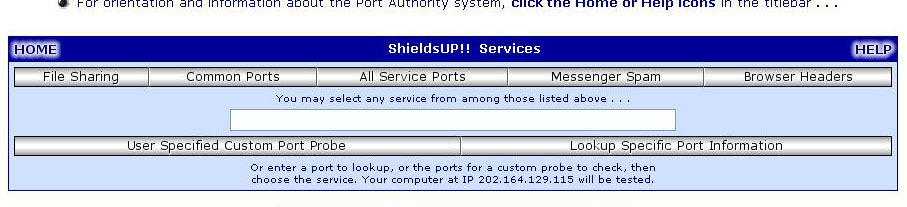
Once you get to the page click on proceed. And when you get to the next page you will see the following options:-


From the list you can choose which kind of scan you want to do. As you can see you have different options:-

1. File sharing:- If you want to check whether your personal computer is working as an Internet server without your knowledge nor your permission and that whether it is serving up all or many of your personal files for reading, writing, modification and even deletion by anyone, anywhere, on the Internet you should click on this option.

This will scan port 139 and also try to connect with NetBios to your pC and if the scan says that it cannot connect to either then it means your firewall is doing a good job.

2.Common parts:- This helps you to do a quick check up on the most common ports used for services like HTTP, HTTPS , RPC, NNTP etc:- If the scan gives you a stealth status that is best you can get. If any hacker doing a port scan looking for this ports to be open and your firewall has stealthed all these ports it simply means that the port scanner does not even know this ports exist on your Ip address. A good firewall always is in stealth mode.

3.All service ports:-Use this one if you want to probe all the service ports and not just the common ports. The scanner scans all these ports in a grid and if all the grids are in green then it means all these ports are stealthed. The scanner looks for open, closed and stealthed ports. If your firewall does not stealth the ports at least it should have closed the ports.

But stealth mode is what good firewalls are capable of doing so that any one using a port scanner with a malicious intent never even know such a port exists in your machine while the port scanning is on.

4.Messenger spam:-
You guys probably know the problem created by Microsoft's various servers that are open and running, by default, on port 135. So this test lets you verify that Windows Messenger spam can not reach the system you are currently using.

You will see the default message written on the space but if you want to write something else do that and then hit the "Spam me with this note" button. If your Internet service provider (ISP), personal computer system, personal firewall, NAT router, or network is not currently blocking UDP traffic into port 135, and if you are running a version of Windows with the Windows Messenger Internet server enabled and listening for incoming UDP messages on port 135, a number of "Messenger Service" pop-up dialog boxes will immediately appear on your system's screen.

5.User specified Custom port Probe:- If you want to probe only a particular port then you can type that port number into the space provided and then hit this button and it will only scan that particular port.

6. Look up specific port information:- Hitting this button does not probe any ports. This button can used if you want to know the information regarding a particular port. If you want to know what service a port stands for and what protocol it uses and things like that you can type the port number in the space and then hit the button to learn the information about that particular port.

Remember that a good firewall will always be in stealth mode.

If the firewall is good and in stealth mode then not a single packet will be received from your system while the GRC probe test is being done. Your system will ignore and refuse to reply to repeated Pings (ICMP Echo Requests). This means any hacker who uses the port scanner, does not even know that your machine even exists on the Internet. Some personal firewalls or security systems expose their users by attempting to "counter-probe the prober", thus revealing themselves. And that means the firewall lets your system to be advertised on the net which is not a good thing at all except for the person using the port scanner.

____________________________________________________________________________________
SECTION III BROWSER TEST
____________________________________________________________________________________
The "Browser headers" button which you see among the other buttons (which you must have already seen in the screen shot of the GRC probe test page I have given above) can be used to find out what all information your browser is sending. Since it is not a firewall test and totally a browser test I have categorized it under this section.

Once you hit this button it will take you to a page which shows all the header information your browser is giving out to the world outside.

This page lets you to determine exactly what identifying information is being sent from your browser when it asks for any object from an Internet web server. If you choose to experiment with any of the third-party proxy and cookie filters, this page allows you to easily perform configuration experiments and to quickly verify that filtering is present and functioning as you expect and intend.

Once you hit the browser header button and get to the page you will see a whole lot of information there. You can use the "Feed browser this cookie" button to learn exactly how they operate by filling-in a non-blank name and value pair and also the "switch page to non-secure" button if you want to just check more details and do some experiments.

As many of you know your browser provides a whole lot of information to sites you visit and also to the third parties. With javascript and active x and cookies enabled it provides a whole lot of information. Even the pages you last visited or the page you came from is all know if the referrer logging is on.

Unfortunately with a million websites popping up each day it is hard to keep track of which one is good and which one is malicious. An unsuspecting user can just follow a link and land up in a site that uses malicious scripts and snooping techniques. The only way to work around this is by disabling the java scripts and active x and cookies before you visit an unfamiliar website.

You might be also interested to read about the firewall leak testing tool.

Also to be on the safer side read the article I wrote about phishing attacks. As the saying goes....a stitch in time saves nine.

Wednesday, November 01, 2006

Everything you want to know about Phishing attacks.

(If you are interested in reading only about how to protect yourself from phishing, then go part IV of this article where it is mentioned "How to protect yourself from phising." It also includes some tips for Myspace users. And, Part V of this article has links to freeware utilities to protect yourself.)

This article is divided into four parts:-

PART I WHAT IS PHISING AND DETAILS ABOUT PHISHING.
PART II MYSPACE USERS BE WARNED.
PART III IMAGES OF SOME PHISHING SCAMS.
PART IV HOW TO PROTECT YOURSELF FROM PHISING.
PART V FREE UTILTIES TO KEEP YOURSELF SECURED.


PART I WHAT IS PHISHING AND DETAILS ABOUT PHISHING:-


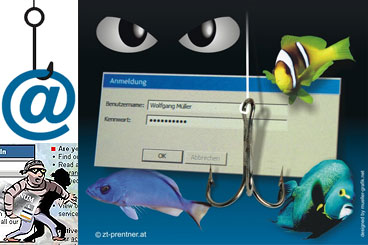
Well to start with for those who are not very familiar with the term, phishing is a criminal activity to fraudulently acquire sensitive information, such as passwords and credit card details, by masquerading as a trustworthy person or business in an electronic communication. Phishing is typically carried out using email or an instant message, although phone contact has been used as well.

Phishing involves sending email messages that seem to come from trustworthy sources, such as banking entities, but attempt to harvest confidential user data. In order to do so, they usually include a link that, if accessed, takes the user to a fake website. By doing this, users believe they are interacting with a trustworthy website, enter the information requested, which finally ends up in the hands of the fraudster.

Some of the most common characteristics that these forged email messages present are:


  • Use of the names of existing companies. Instead of creating a company's website from scratch, fraudsters imitate the corporate image and website functionality of an existing company in order to further confuse recipients of the forged message.
  • Use of the name of a real company employee as the sender of the spoofed message. By doing so, if recipients attempt to confirm the authenticity of the message by calling the company, they will be assured that the person that acts as spokesman of the company does actually work for the company.
  • Web addresses that seem to be correct. Forged emails usually take users to websites that imitate the appearance of the company used as bait to harvest the information. In fact, both the contents and the web address (URL) are spoofed and simply imitate legitimate contents. What's more, legal information and other non-critical links could redirect trusting users to the real website.
  • Fear factor. The window of opportunity open to fraudsters is very short, as once the company is informed that its clients are targets of these techniques, the server that hosts the fake website and harvests the stolen information is shut down within a few days. Therefore, it is essential for fraudsters to obtain an immediate response from users. On most occasions, the best strategy is to threaten them with either financial loss or loss of the account itself if the instructions outlined in the forged email are not followed, which usually refer to new security measures recommended by the company.

In addition to obscuring the fraudulent URL in an apparently legitimate email message, this kind of malware also uses other more sophisticated techniques:


  • Man-in-the-middle. In this technique, the fraudster is located between the victim and the real website, acting as a proxy server. By doing so, he can listen to all communication between them. In order to be successful, fraudsters must be able to redirect victims to their own proxy, instead of to the real server. There are several methods, such as transparent proxies, DNS Cache Poisoning and URL obfuscation, among others.
  • Exploitation of Cross-Site Scripting vulnerabilities in a website, which allow a secure banking web page to be simulated, without users detecting any anomalies, neither in the web address nor in the security certificate displayed in the web browser.
  • Vulnerabilities in Internet Explorer, which by means of an exploit allow the web address that appears in the browser address bar to be spoofed. By doing so, while the web browser could be redirected to a fraudulent website, the address bar would display the trustworthy website URL. This technique also allows false pop-up windows to be opened when accessing legitimate websites.
  • Some attacks also use exploits hosted in malicious websites, which exploit vulnerabilities in Internet Explorer or the client operating system in order to download keylogger type Trojans, which will steal confidential user information.
  • Pharming is a much more sophisticated technique. It consists in modifying the contents of the DNS (Domain Name Server), either via the TCP/IP protocol settings or the lmhost file, which acts as a local cache of server names in order to redirect web browsers to forged websites instead of the legitimate ones, when the user attempts to access them. Furthermore, if the victim uses a proxy in order to remain anonymous while surfing the web, its DNS name resolution could also become affected, so that all the proxy users are redirected to the false server.

RECENT SURVEY

Accorindg to Zdnet the study, released on Monday, showed that the number of brands under attack from phishing was up 20 percent from June and 12 percent from the previous record in May. According to the study "In a year, the number of brands has more than doubled, illustrating that online criminals are simply not settling for the large, popular organizations and financial institutions,"

Dan Hubbard, vice president of security research at Websense, said in a statement. "The increase in the complexity of attacks goes hand-in-hand with the massive growth in phishing Web sites and the targeted, broad selection of brands that has followed."

The U.S. topped the list of countries hosting phishing sites, with 29.9 percent, followed by the Republic of Korea with 13.3 percent, China with 12 percent, France with 5.9 percent and Australia with 4.6 percent.
Attacks are getting more sophisticated, the group found, noting that a malicious site is now capable of placing a Trojan horse onto a system without user interaction. The Trojan involved, Web Attacker, is a Russian do-it-yourself toolkit sold for anywhere from $20 to $300.


PART II MYSPACE USERS BE WARNED


"Password-stealing MySpace log-in page removed"

Well that exactly was the heading of the Scmagazine article that appeared just two days ago.

Yes MySpace recently shut down a bogus profile page that was used to relay usernames and passwords to a remote server in France. The page was created using specially crafted HTML to eliminate the normal appearance of a user profile and instead resemble the real MySpace log-in page, according to internet monitoring firm Netcraft. Users would arrive at the page by following a phishing link. The fraudulent page was harvesting log-in details and communicating with a server in France, Paul Mutton, Netcraft's internet services developer, said Friday in a blog post.

With more than 100 million members and in the global top 10 of most visited websites, MySpace increasingly has become an attractive target for the malicious community, looking to take advantage of a young user set that is more trusting and less security minded than older generations.

Kevin Beecroft of Mashable labs in his very recent article says that MySpace Phishing Attack Appears on 3000 Pages. He goes on to say that a proportion of these pages are today active and will steal your email and password if you give it to them. The fake login pages are very convincing and even fooled Firefox into automatically filling in his credentials. Even cautious Internet users could get caught off guard by this trick.

You can also check out the netcraft page where you can see the illustrations on how the myspace login page was compromised.

I have given some tips for myspace.com users too to protect themselves under the "How to protect yourself from phishing" section.


PART III IMAGES OF SOME PHISHING SCAMS.


Above is a image from an email where Bank of America's name was used for the phishing attack. When the cursor was put on the hyperlink on which it says "To update your records click on the following link" it was clearly seen that link directs to a lycos.fr page and not Bank of America. That is why it is said always check for the url before u even login, whether it is yahoo account or bank account or whatever. And moreover banks will never ask you to fill in your personal data online.

Here is an example of phishing using paypal as the weapon.

Here is yet another example of how scare tactics are used to prompt the user to click on the link.


PART IV HOW TO PROTECT YOURSELF FROM PHISING.


Keep Antivirus Up To Date-
One of the most important things you can do to avoid phishing attacks is to keep your antivirus software up to date because most antivirus vendors have signatures that protect against some common technology exploits. This can prevent things such as a Trojan disguising your Web address bar or mimicking an https secure link. If your antivirus software is not up to date, you are usually more susceptible to attacks that can hijack your Web browser and put you at risk for phishing attacks.


Do Not Click On Hyperlinks In E-mails-
It is never a good idea to click on any hyperlink in an e-mail, especially from unknown sources. You never know where the link is going to really take you or whether it will trigger a malicious code. Some hyperlinks can take you to a fake HTML page that may try to scam you into typing sensitive information. If you really want to check out the link, manually retype it into a Web browser.


Take Advantage Of Anti-Spam Software-
Anti-spam software can help keep phishing attacks at a minimum. Many attacks come in the form of spam. By using anti-spam software, you can prevent most types of phishing attacks because the message will never end up in your mailbox.

Verify HTTPS (SSL)-
Whenever you are passing on sensitive information such as credit cards or bank information, make sure the address bar shows "https://" rather than just "http://" and that you have a secure lock icon at the bottom right hand corner of your Web browser. You can also double-click the lock to guarantee the third-party SSL certificate that provides the https service.

Many types of attacks are not encrypted but mimic an encrypted page. Always look to make sure the Web page is truly encrypted. The web address must begin with https:// and a little closed padlock must be displayed on the status bar of the browser.Double-click the padlock in order to view the digital certificate that confirms the website you are accessing is actually the one you expected.

Use Anti-Spyware Software-
Keep spyware down to a minimum by installing an active spyware solution and also scanning with a passive solution. If for some reason your browser is hijacked, anti-spyware software can often detect the problem and safely remove it.

Get Educated-
Educate yourself on how to prevent these types of attacks. A little research on the Internet may save you a great deal of pain if you are ever the victim of identity theft. You can report any suspicious activity to the FTC (in the U.S.). If you get spam that is phishing for information, forward it to spam@uce.gov. You can also file a phishing complaint at the "www.ftc.gov" (Federal Trade Commission). Another great resource is the FTC's identity theft page to learn how to minimize your risk of damage for ID theft. Visit the FTC's spam page to learn other ways to avoid e-mail scams and deal with deceptive spam.


Use The Microsoft Baseline Security Analyzer (MBSA)-
You can use the MBSA to make sure all of your patches are up to date. You can download this free tool from Microsoft's web site. By keeping your computer patched, you will protect your system against know exploits in Internet Explorer and Outlook (and Outlook Express) that can be used in phishing attacks.


Firewall-
Use a desktop (software) and network (hardware) firewall. On the desktop, you can use a software firewall or use Microsoft's built-in software firewall in Windows XP. The incorporation of a firewall can also prevent malicious code from entering your computer and hijacking your browser.

Use Backup System Images-
Keep a backup copy or image of all systems in case of foul play. You can then revert back to a pure system state if you suspect that a phishing attack, spyware, or malware has compromised the system.

Don't Enter Sensitive Or Financial Information Into Pop-up Windows-
A common phishing technique is to launch a bogus pop-up window when someone clicks on a link in a phishing e-mail message. This window may even be positioned directly over a window you trust. Even if the pop-up window looks official or claims to be secure, you should avoid entering sensitive information because there is no way to check the security certificate. Be sure to close pop-up windows by clicking on the X in the top-right corner. Clicking cancel may send you to another link or download malicious code.

Secure The Host File-
A hacker can compromise the hosts file on a desktop system and send a user to a fraudulent site. Configuring the host file to read-only may alleviate the problem, but complete protection will depend on having a good desktop firewall that protect against tampering by outside attackers and keep browsing safe.

Protect Against DNS Pharming Attacks-
This is a new type of phishing attack that doesn't spam you with e-mails but poisons your local DNS server to redirect your Web requests to a different Web site that looks similar to a company Web site (e.g. eBay or PayPal). For example, the user types in eBay's Web address but the poisoned DNS server redirects the user to a fraudulent site. This is what is considered new age phishing. This needs to be handled by an administrator who can use modern security techniques to lock down the company's DNS servers.

Always verify the information source -
Do not automatically reply to any email message that asks for your personal or financial information. If you feel uncertain about whether that company really needs the kind of information it is requesting, pick up the phone book and phone your usual contact, in order to check the information source.

Type the web address in your Internet browser yourself-
Instead of clicking on the links in the email message, type the web address (URL) in your browser, or use a previously defined bookmark. Even web addresses that look correct in the email message can be the path to a fraudulent website.

Reinforce your security-
Users making transactions through the Internet should install security suites that block this kind of threat on their computers, apply the latest security patches available through their usual vendors and make sure that they are operating in secure mode using digital certificates or communication protocols such as HTTPS.

Regularly check your accounts-

Monthly statements are particularly useful to detect irregular transfers and transactions, both operations that you did not make but are reflected in the statement and operations made online but not reflected in the statement.

Myspace users:-

With the recent phishing attacks on myspace.com it is always safe now that you log in through your own page. Don't go to someone else's page and then log in through that page when it says "You need to log in to do that" Instead always take the safer path of logging first directly through your own account.

And never use a password and email which you use for your financial or very personal reasons on myspace. Use a separate email account and a unique password only for myspace.

Also MySpace.com suggests on its site that users do not reply to email or pop-up messages that seek personal or financial information, or click on links found in such messages.

These tips should be followed not just for myspace but for other popular sites too. Combine these tips with all the other tips mentioned above and you will be safe.


PART V FREE UTILTIES TO KEEP YOURSELF SECURED:-


Go here to get some of the best free utilities to protect yourself. Check out the utilities under the "Essential Downloads" to get some of the best spyware/adware removal tools and anti-virus and internet privacy tools. I personally use some of these free stuffs simply because they are just too good even if they are free. Also Check out the most popular section and the Editor's pick section. There are some awesome free tools there. The best free utilities like the adware/spyware removable tool Spybot Search and Destroy, Zone Alarm firewall and AVG anti-virus are all there among all the other things you need to protect yourself. Take a good look there. Basis 5 things you need are:- An Antivirus, A firewall, An Antispyware (ideally two), Anti Trojan, And an Anti Rootkit.

Use the netcraft toolbar if you like to. Check it out here. It was netcraft tool bar user that detected one of the fake pages at myspace recently and reported it to netcraft.

Related Reading:-
27 steps to prevent Virus.
Best free Antivirus softwares.
Great free tool to detect spywares.
Keeping your password safe and related tools.
What are root kits and Rootkit detecting sofwares.


(This article was written based on information from the following sources and from my own experience)
Credits:-
Zdnet.
Whitecanyon.
Securityfocus.
Wikipedia.
Security.yahoo.
Kevin Beecroft of mashable labs.
Scmagazine.
Pandasoftware.
Netcraft.

Google